


Honeydew: Recipe Manager
4.8482.00 Reviews
App Specs
- Version
- 1.8.0
- Updated On
- License
- Free
- Downloads
- 100,000+
- Developer
- Red Honey
- Categories
- Food & Drink
- Platform
- Android
Screenshots



 Analysis by AppCompare
For me, the most useful recipe app is the one that helps turn a passing “that looks good” into something I can actually cook on a busy weeknight. Honeydew: Recipe Manager is aimed at that gap: it brings recipes and meal planning together, so promising dishes have a better chance of making it onto the table instead of disappearing into a saved-video pile. Its focus on viral recipe videos gives it a more discovery-led feel than a basic digital cookbook, though the planning tools are what make it practical day to day.
What you get before spending anything
Honeydew is a free food and drink app from Red Honey, and that makes it easy to try without having to commit money up front. The app is rated for Everyone, and its current version is 1.7.3, with Android 7.0 as the minimum operating-system requirement. It has a 4.8 average from around 8,300 ratings and has passed 100,000 installs, which gives a newcomer some context for its reach without telling the whole story of how it will fit their kitchen routine.
There are in-app purchases, with listed items ranging from $0.99 to $199.99. That range is broad, so I wouldn’t assume every useful part requires payment—or assume a particular purchase is essential—without checking the purchase details shown in the app. The sensible approach is to start with the free access, see whether the recipe-to-plan workflow suits you, and only consider a purchase if its terms and benefits are clear to you. The price of an individual item doesn’t by itself explain what it unlocks or whether it is worthwhile.
Where the value comes from
The strongest case for Honeydew is the bridge between inspiration and execution. A recipe video can look appealing while you scroll, but saving it is only the first step; you still have to find it later, decide when to cook it, and work out what to buy. Honeydew’s meal-planning focus addresses that handoff. If you regularly collect ideas from short-form cooking videos, putting recipes into a more deliberate weekly routine can be more useful than keeping them scattered across bookmarks, screenshots, and social feeds.
That value depends on how you cook. Someone who makes the same few meals from memory may not need a dedicated organizer. But if your saved recipes are hard to retrieve, or your shopping trips are often based on a last-minute guess, a single place for planning can help reduce that friction. I’d judge the app less by how many recipes it can hold and more by whether I actually use a saved idea on a real evening.
The tradeoffs I would keep in mind
A recipe manager can organize choices, but it can’t make every online recipe clear, reliable, or suited to your taste. Video-led inspiration may also encourage collecting more dishes than you have time to cook. I’d treat the weekly plan as an editable shortlist, not a promise to follow every meal exactly. Before shopping, it’s worth checking that the ingredients and quantities still match the recipe you intend to make, especially if you have adjusted a serving or plan to substitute something.
There is also a learning curve in deciding how much structure you want. If you enjoy browsing freely and choosing dinner at the last minute, maintaining a plan may feel like another chore. If you already rely on a grocery or calendar app, you may prefer to keep those routines rather than duplicate them. Honeydew makes most sense when recipe discovery and meal planning are both problems you want to solve in the same place.
Worth Reading Before You Choose

Flipboard Shows What News Apps Must Do Beyond the Feed

Switching to Android Auto Means Rethinking Your Driving Routine

Google Calendar Makes a Crowded Week Easier to Manage

Ludo King Makes the Most of the Minutes Between Plans

Baby Panda World Brings Quick Play to Modern Phones, but Its Game Library Feels Busy

ESPN’s Live Game View Makes Following Close Games Easier
Who is likely to get the most out of it?
I’d recommend giving it a try if you often see recipes in videos, save them for later, and then forget where they went. It may also suit a household that wants to decide several dinners in advance and turn those decisions into a more focused shopping list. The key benefit is not a promise of effortless cooking; it is having a practical route from “I want to try this” to “I know when I’ll make it.”
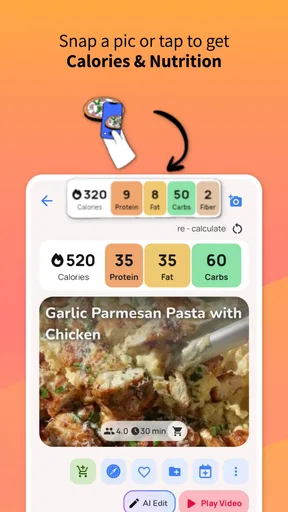
On the other hand, people who mainly cook from a small set of handwritten family recipes may be happier with a notebook or a simple notes app. And if you need a specialist nutrition tracker, strict dietary analysis, or a grocery service built around delivery, a recipe manager may not replace those tools. I’d choose Honeydew for organizing cooking ideas and plans, not as a substitute for every food-related app.
For a realistic test, I’d start with one busy week rather than trying to organize my entire cooking life at once. Save a handful of recipes I genuinely want to make, place only the realistic ones into the plan, and check the resulting shopping list before heading to the store. That small trial reveals whether the app fits my habits: if I use the plan when deciding what to cook, it is earning its place; if I keep returning to the same old bookmarks, I have my answer without investing much time.
My experience using Honeydew
If you're anything like me, trying to keep track of recipes can sometimes feel like herding cats. That's where Honeydew: Recipe Manager comes in handy. This app is like your personal digital sous-chef, keeping all your culinary creations organized and easy to access. Let me take you through my experience with this nifty tool.
Getting Started with Honeydew
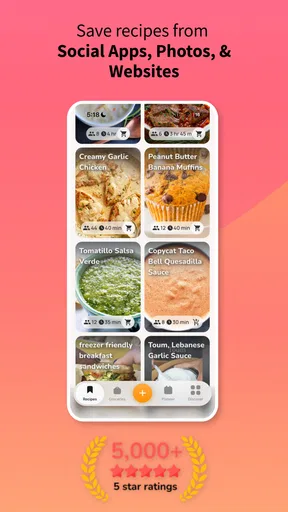
First things first, downloading Honeydew from the App Store or Google Play was a breeze. The app's interface is clean and intuitive, which made diving right in a piece of cake (pun intended). Setting up my profile and starting to add recipes was straightforward. I particularly appreciated how the app allows you to import recipes from popular websites with just a couple of taps. No more manually typing out long lists of ingredients!
Features That Make Life Easier
One of the standout features of Honeydew is its ability to categorize and organize recipes. You can sort your recipes into different folders, making it easy to find what you’re in the mood for. Whether you’re planning a fancy dinner party or just a quick weekday dinner, everything is right where you need it.
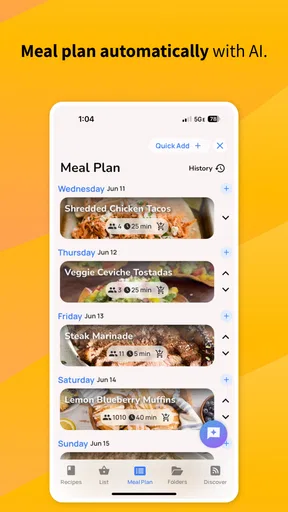
The app also includes a meal planner. This feature is a game changer for anyone trying to eat healthier or stick to a budget. Planning meals for the week and creating a shopping list directly from the recipes saved me a ton of time. Plus, it helps reduce food waste since you’re buying only what you need.
User Experience and Design
The design of Honeydew is modern and aesthetically pleasing. It’s not just about looks, though—the functionality is top-notch. I found the search function particularly helpful. You can search by ingredient, recipe name, or even dietary restrictions. For someone with a gluten-free friend, this makes it easy to whip up something both delicious and compliant.
I also loved the ability to share recipes. Whether you want to text a recipe to a friend or share it on social media, Honeydew makes it simple. The app even provides a handy option to print recipes directly from your phone.
Keeping Track of Your Culinary Adventures
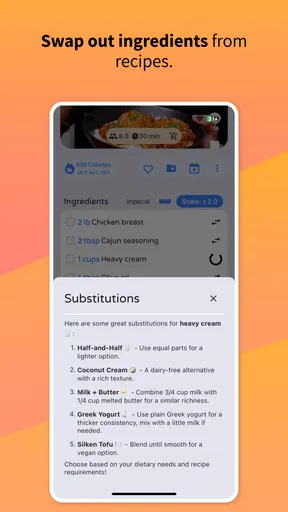
One feature that I didn’t know I needed until I had it is the notes section. You can jot down any tweaks or substitutions you made to a recipe, and the app saves it for future reference. It's like a digital version of those scribbles you’d make in the margins of a cookbook.
Another cool feature is the ability to rate recipes. This helps you remember which dishes were a hit and which might need a little more tweaking next time. It’s also helpful when browsing new recipes to try.
Why Honeydew Stands Out
In a sea of recipe apps, Honeydew stands out thanks to its user-friendly design and comprehensive features. It doesn’t just store your recipes—it enhances your entire cooking process. From planning to shopping to cooking, Honeydew has you covered.
Now, I know what you’re thinking: “Can an app really be that helpful?” In my experience, absolutely. It’s like having a little kitchen assistant right on your phone, ready to help you become the culinary genius you were meant to be.
So, if you’re ready to take your cooking game to the next level, give Honeydew a try. It's the perfect blend of technology and culinary creativity, and I think you'll find it as indispensable as I have.
A practical way to decide
I would approach Honeydew as a low-commitment experiment rather than a tool I must immediately build my whole kitchen routine around. The free access gives me room to see whether collecting recipes, sorting them, and planning meals in one place changes what I actually cook. If it does, that is meaningful value even before I consider any optional purchase. If it doesn’t, a notes app or the saving tools already built into a social platform may be enough for my needs.
One useful habit is to save recipes with a specific meal in mind instead of treating every appealing clip as a future obligation. I’d note which dishes work for a weeknight, which need more time, and which are better suited to a day when I can enjoy cooking. That makes the organizer serve my schedule rather than turning into a second feed to browse. The practical test is whether I can find a suitable dinner quickly when I’m tired, not how impressive my collection looks.
Small workflow choices that matter
When importing a recipe from a website, I’d still give the saved version a quick check before relying on it. Ingredient lists and instructions can be presented differently from site to site, and a cleanly imported entry is most useful when the details I need are easy to scan. I’d also use the notes area for changes that affect the next attempt—such as a substitution that worked or a timing adjustment—rather than writing a full cooking diary. That keeps useful lessons close to the recipe without adding much upkeep.
For shared meals, I’d send the recipe before the day of cooking so another person can check ingredients or suggest a different choice in good time. Sharing is handy, but it doesn’t automatically settle questions about allergies, serving sizes, or whether a dish suits everyone. I’d verify those details directly rather than treating a folder label or search result as a guarantee. This is especially important when a dietary need is strict: discovery and organization help narrow options, but careful ingredient checking remains part of cooking.
How it compares with familiar alternatives
Compared with a paper cookbook, Honeydew is more convenient when I want to collect online recipes and search through them rather than flip pages. A notebook is still appealing if I want a completely personal record with no setup and enjoy writing changes by hand. Compared with saving posts in a video or social app, a recipe manager has a clearer purpose: it helps turn a saved idea into an organized plan. But the social app may be faster for casual browsing, and a dedicated grocery tool may be better if the main task is managing store purchases rather than deciding what to cook.
That distinction helps set expectations. I wouldn’t choose Honeydew simply because it has a meal planner; I’d choose it if keeping recipe inspiration and meal decisions connected would remove a recurring annoyance. If my main challenge is nutrition logging, delivery, or coordinating a household calendar, a specialized app may do that particular job better. Honeydew’s value is strongest when I want a home for recipes and a path from those recipes to the week’s meals.
What I would want to know before relying on it
Can it fit a flexible household routine? I think so, provided I treat the plan as a guide and allow for changes when schedules shift. Does it remove all meal-planning work? No; I still have to decide what sounds good, check what I have, and make sensible adjustments. Is it useful if I don’t follow viral cooking videos? It can still help with organizing recipes and planning, but its discovery-led appeal will matter less if my recipes already come from cookbooks or family notes.
Would I pay for an in-app item? I’d first look carefully at the specific purchase and what it offers, because the range of listed purchase prices alone cannot tell me whether it fits my needs. I would not spend just to unlock a vague promise of convenience. I’d only consider paying if I had already used the free experience enough to identify a limitation that the purchase clearly addresses and the cost made sense to me.
My buy-or-skip verdict
I’d try Honeydew if my phone is full of recipe inspiration but my weekly meals still come together at the last minute. Its mix of recipe organization, planning, and shopping support gives it a clear role for cooks who want to act on the dishes they save. The free starting point makes that trial approachable, while the optional purchases are a reason to check the details before spending rather than a reason to assume the whole app is paid.
I’d skip it if I prefer spontaneous cooking, rarely save recipes, or already have a system that I consistently use. I’d also look elsewhere if my priority is a specialist food tool rather than recipe planning. For everyone in between, my advice is simple: test it with a realistic week, keep the plan modest, and judge it by whether it makes choosing and shopping for dinner easier. If it turns saved ideas into meals I genuinely cook, that is the kind of everyday value I want from a recipe app.
Pros
- User-friendly interface for easy navigation.
- Syncs recipes across multiple devices seamlessly.
- Allows personalized recipe categorization.
- Integrated shopping list feature is very handy.
- Supports recipe import from various sources.
Cons
- Limited offline functionality available.
- No voice command support for hands-free use.
- In-app purchases can be pricey.
- Occasional syncing issues reported.
- Recipe editing options are somewhat limited.
FAQs for Honeydew: Recipe Manager
What is Honeydew: Recipe Manager?
Honeydew: Recipe Manager is an intuitive app designed for cooking enthusiasts and home chefs. It allows users to organize, store, and access their favorite recipes with ease. The app features a user-friendly interface that simplifies meal planning, ingredient management, and even shopping list creation.
How can I import my existing recipes into Honeydew?
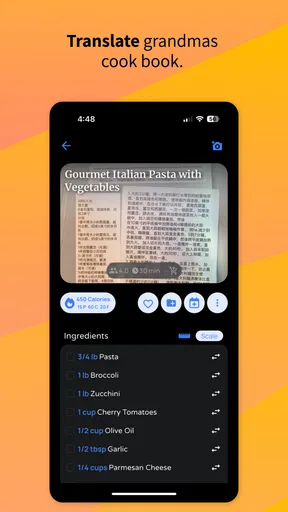
Honeydew offers multiple ways to import recipes. You can manually enter recipes, import them from popular cooking websites, or even scan handwritten recipes using its built-in OCR technology. This flexibility ensures that all your culinary favorites are conveniently stored in one place.
Does Honeydew allow for meal planning and shopping list creation?
Yes, Honeydew excels at meal planning and shopping list creation. Users can plan meals for the week, generating organized shopping lists based on selected recipes. The app categorizes ingredients to streamline grocery shopping, saving you time and reducing food waste.
Is Honeydew: Recipe Manager suitable for dietary restrictions?
Absolutely! Honeydew allows you to tag recipes with dietary preferences and restrictions, such as vegan, gluten-free, or nut-free. This feature helps you quickly find recipes that meet your dietary needs, making meal preparation easier and more enjoyable.
Can I share recipes with friends and family through Honeydew?
Yes, Honeydew makes sharing recipes simple. You can share your favorite recipes via email, social media, or directly within the app. This feature encourages culinary collaboration and helps you spread your love for cooking with others.


